
Keyword research is one of the most important parts of SEO.
Before writing an article, creating a blog post, launching a website, or building a content strategy, you need to understand what people are actually searching for. The problem is that many popular keyword research tools are expensive. For beginners, bloggers, small businesses, and new website owners, paying for multiple SEO tools every month may not be practical.
So I decided to test five free keyword research methods to see what they could actually provide.
The goal was simple: find useful keyword ideas without relying on an expensive premium SEO subscription.
I tested each method based on several factors:
- How easy it was to use
- How many keyword ideas it generated
- How useful the suggestions were
- Whether the method helped identify search intent
- Whether it could help find less competitive opportunities
- How useful it was for creating actual content
Some methods were surprisingly useful. Others produced a lot of data but required significant filtering.
Here is what I actually found.
Why Free Keyword Research Still Works
Many people assume that serious keyword research requires expensive tools.
That is not entirely true.
Paid SEO tools can provide valuable data such as estimated search volume, keyword difficulty, competitor analysis, backlink data, historical trends, and ranking information. However, you can still discover excellent keyword opportunities using free methods.
The biggest difference is that free keyword research often requires more manual analysis.
Instead of entering a keyword and immediately receiving a complete report, you may need to:
- Search for a topic manually
- Analyze the results
- Study Google’s suggestions
- Look at related searches
- Examine competitor content
- Compare multiple keyword variations
- Identify the actual search intent
In other words, free keyword research can work extremely well, but you need to do more of the thinking yourself.
For my test, I used a sample topic related to SEO and digital marketing. I wanted to see which methods could help me discover relevant keywords that could be turned into useful content.
Here are the five methods I tested.
Method 1: Google Search Suggestions
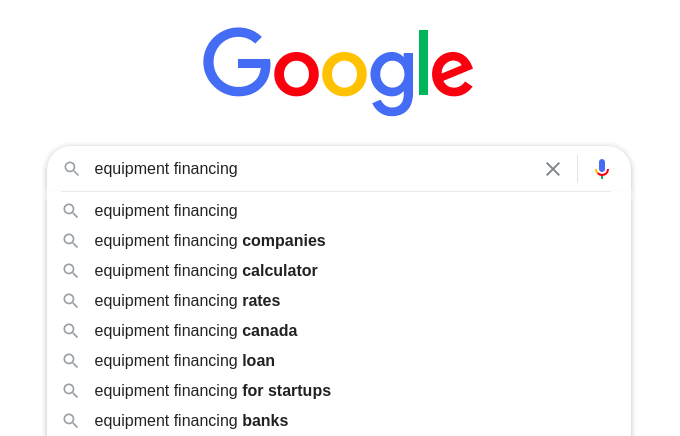
The first method was the simplest one.
I started typing a broad keyword into Google and looked at the autocomplete suggestions.
For example, if you start typing:
keyword research
Google may suggest variations related to:
- keyword research tools
- keyword research for beginners
- keyword research free
- keyword research for YouTube
- keyword research for blogs
- keyword research examples
These suggestions are valuable because they are based on actual search behavior.
Google does not randomly generate these suggestions. The suggestions are influenced by what people search for and how frequently certain search patterns occur.
What I Found
Google autocomplete was excellent for generating initial keyword ideas.
The biggest advantage was relevance.
The suggestions were usually closely related to the original topic. This made it easy to discover different variations of the same search query.
For example, a broad topic like:
SEO
can lead to ideas such as:
- SEO for beginners
- SEO tools
- SEO checklist
- SEO strategy
- SEO for small business
- SEO tips
- SEO mistakes
You can also add letters to expand the research.
For example:
keyword research a
keyword research b
keyword research c
This can reveal many additional variations.
The Main Limitation
Google autocomplete does not provide detailed keyword metrics.
You usually will not know:
- Exact monthly search volume
- Keyword difficulty
- Number of competing websites
- Estimated traffic potential
However, this does not make the method useless.
The purpose of autocomplete is not to give you every SEO metric. Its main purpose is to reveal topics and phrases that real users search for.
My Verdict
Rating: 8.5/10
Google autocomplete was one of the fastest ways to generate relevant keyword ideas.
It is particularly useful during the early stages of keyword research.
Method 2: Google’s People Also Ask Section
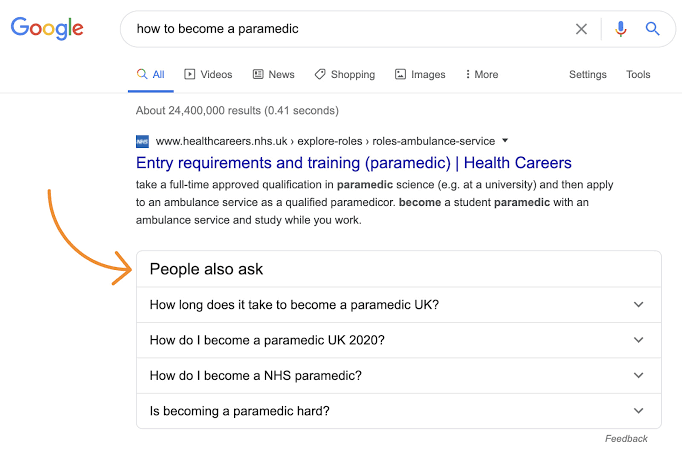
The second method involved Google’s “People Also Ask” section.
When you search for a topic, Google often displays related questions that users commonly search for.
For example, a search related to keyword research might produce questions such as:
- What is keyword research?
- How do beginners do keyword research?
- What is the best free keyword research tool?
- How do I find keywords for SEO?
- Is keyword research still important?
These questions are extremely useful for content planning.
What I Found
The People Also Ask section was particularly useful for understanding search intent.
Keyword tools often show you a list of phrases. However, the People Also Ask section shows you the questions people have about a topic.
That is a major difference.
Suppose you are writing an article targeting the keyword:
free keyword research tools
You may discover related questions such as:
- What is the best free keyword research tool?
- How can I do keyword research for free?
- Is Google Keyword Planner free?
- How many keywords should I use in an article?
These questions can become subheadings within your article.
They can also help you create completely separate articles.
Why This Method Is Powerful
Google is essentially showing you related content topics directly inside the search results.
You can use these questions to:
- Find long-tail keywords
- Discover content gaps
- Create FAQ sections
- Understand user concerns
- Improve topical coverage
For example, if you are writing about SEO for beginners, the People Also Ask section can help you build an entire content cluster.
One question can lead to another question. That question can lead to another search. Eventually, you can create a large topic map.
The Main Limitation
The People Also Ask section can sometimes become repetitive.
Some questions may appear across multiple searches. You also need to manually record and organize the keywords.
There is no convenient export button in the standard Google search experience.
My Verdict
Rating: 9/10
This was one of the most useful free methods I tested.
It provided excellent information about search intent and content ideas.
Method 3: Related Searches at the Bottom of Google
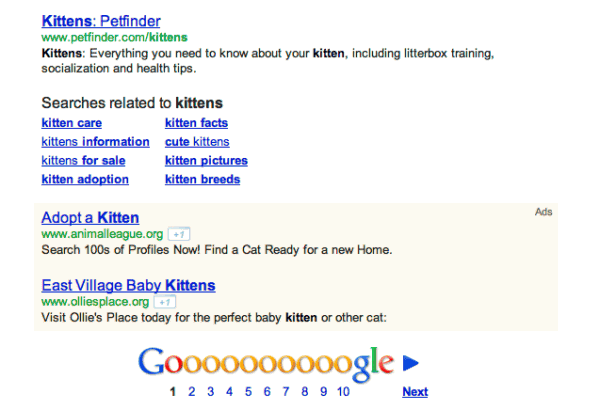
The third method was Google’s related searches section.
After searching for a keyword and scrolling to the bottom of the results page, Google often displays related search terms.
For example, if you search for:
free SEO tools
Google may show related searches involving:
- free SEO tools for beginners
- best free SEO tools
- free SEO tools for website analysis
- free SEO tools for keyword research
These suggestions can reveal related topics that may not appear in autocomplete.
What I Found
The related searches section was useful for discovering variations and adjacent topics.
One important observation was that many related searches represented different levels of search intent.
For example:
keyword research
may represent an informational search.
free keyword research tool
may represent a tool discovery search.
best keyword research tool for beginners
may represent a comparison search.
keyword research tool pricing
may represent a commercial investigation search.
This distinction is important because you should not treat every keyword the same way.
Different keywords require different types of content.
Search Intent Insights
The related searches helped me understand how one broad topic connects to multiple user needs.
For example, someone searching for “keyword research” might want to:
- Learn the basics
- Find a tool
- Compare tools
- Learn a process
- Find examples
- Solve a specific SEO problem
This means one broad keyword can potentially support an entire content cluster.
The Main Limitation
The suggestions are not always specific enough.
Some related searches are extremely broad and may have significant competition.
You still need to analyze the search results before deciding whether a keyword is worth targeting.
My Verdict
Rating: 8/10
This method was simple, fast, and useful for finding related content ideas.
I found it particularly valuable when combined with autocomplete and People Also Ask.
Method 4: Google Keyword Planner
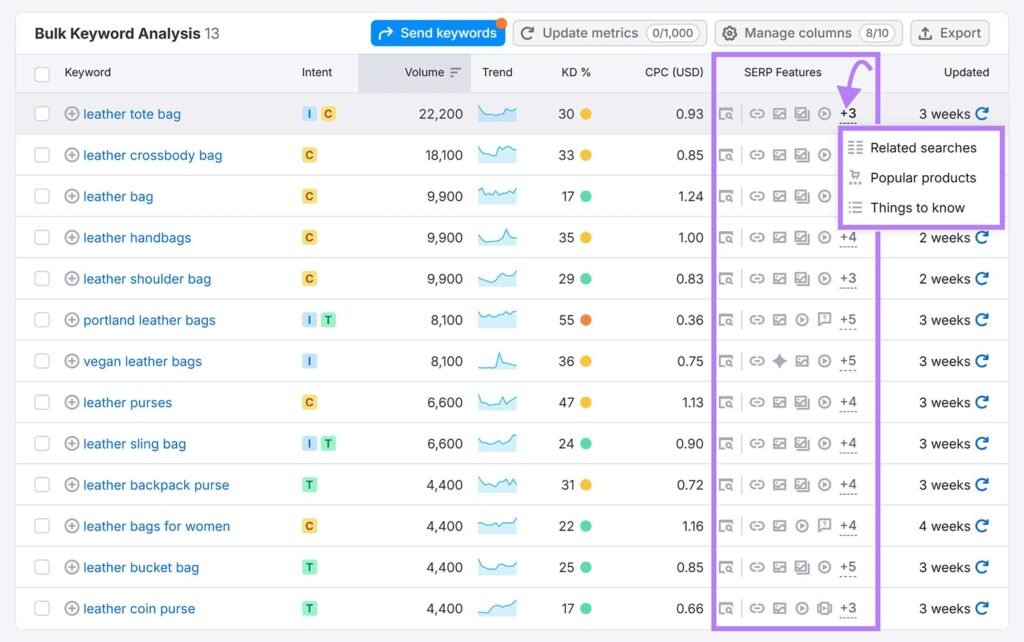
The fourth method was Google Keyword Planner.
Although it is primarily designed for advertisers, it can also be useful for SEO keyword research.
You can enter a keyword or topic and receive keyword ideas related to your search.
What I Found
Google Keyword Planner provided significantly more structured information than the basic Google search methods.
It helped generate keyword variations and provided estimates related to search demand.
This made it useful for organizing keyword ideas.
For example, instead of manually collecting dozens of suggestions from Google, Keyword Planner can help you discover many related terms in one place.
The Best Feature
The biggest advantage of Keyword Planner was its ability to generate a large number of keyword ideas quickly.
If you are building a content plan, this can save a lot of time.
You can use it to discover:
- Broad keywords
- Long-tail variations
- Related topics
- Commercial keywords
- Product-related searches
It can also help identify how a topic is connected to other related searches.
The Main Limitation
The data is primarily designed for advertising purposes.
As a result, the information may not always perfectly represent organic SEO opportunity.
Search volume estimates can also be broad rather than extremely precise.
For example, a keyword may be grouped into a range instead of showing an exact number.
Another limitation is that search volume alone does not tell you whether a keyword is easy to rank for.
A keyword with high search volume may have extremely strong competition.
A keyword with lower search volume may be much easier to rank for and may generate more targeted traffic.
My Verdict
Rating: 8.5/10
Google Keyword Planner was one of the best free methods for generating a large number of keyword ideas.
However, I would not use it alone.
It works best when combined with manual SERP analysis.
Method 5: Studying Competitor Content
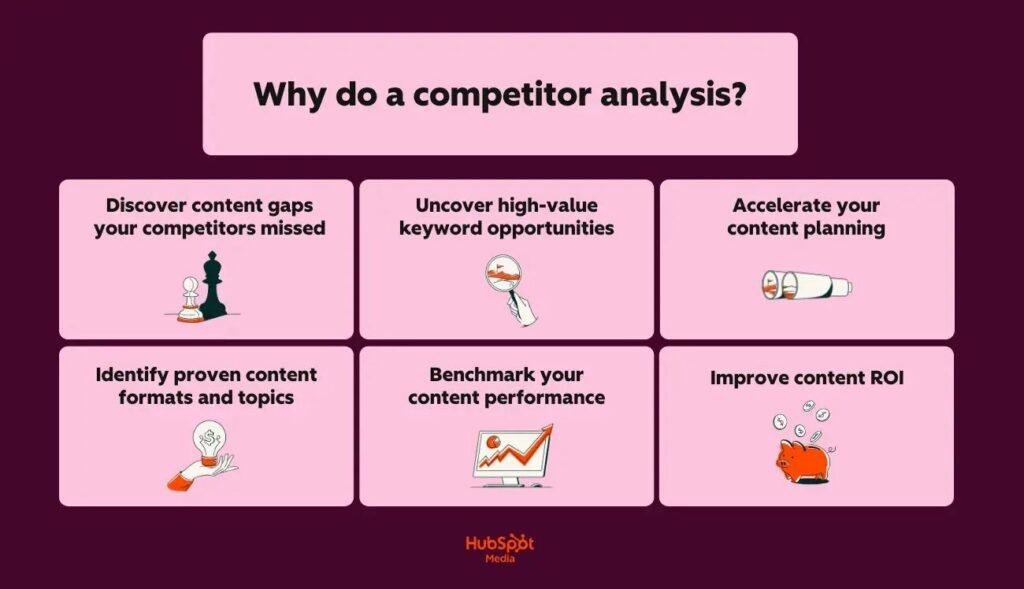
The fifth method was slightly different.
Instead of starting with a keyword tool, I studied websites that were already ranking for topics related to my target subject.
I looked at:
- Their article titles
- Their headings
- The topics they covered
- Frequently repeated phrases
- Questions answered in their content
- Related articles they linked to
This method produced some of the most interesting results.
What I Found
Competitor analysis revealed keywords that I would not have discovered through traditional keyword research.
For example, a competitor might rank for a broad topic but also cover several specific subtopics within the same article.
Those subtopics can provide additional keyword ideas.
Suppose a competitor has an article about:
How to Do Keyword Research
Within the article, they may cover:
- Seed keywords
- Long-tail keywords
- Search intent
- Keyword difficulty
- Competitor analysis
- Keyword mapping
- Content clusters
Each of these topics could potentially become its own article.
The Important Lesson
You should not simply copy competitor content.
The goal is to understand the topic landscape.
Ask yourself:
- What questions are competitors answering?
- What topics are they missing?
- Are their explanations outdated?
- Is their content difficult to understand?
- Are there important examples they have not included?
This can help you identify content gaps.
For example, if every competitor explains a topic in a highly technical way, you could create a beginner-friendly version.
If competitors provide general advice but no practical examples, you could create an example-driven article.
My Verdict
Rating: 9.5/10
Competitor research was the most strategically valuable method I tested.
It required more effort than simply entering a keyword into a tool, but it provided insights that keyword tools often missed.
Which Free Keyword Research Method Was the Best?
After testing all five methods, I do not think there is one single winner.
The best approach was combining them.
| Method | Best For | My Rating |
|---|---|---|
| Google Autocomplete | Quick keyword ideas | 8.5/10 |
| People Also Ask | Search intent and questions | 9/10 |
| Related Searches | Topic expansion | 8/10 |
| Google Keyword Planner | Large keyword lists | 8.5/10 |
| Competitor Research | Strategic content opportunities | 9.5/10 |
If I had to choose only one method, I would choose competitor research.
However, the best overall workflow combines all five methods.
My Free Keyword Research Workflow
Here is the exact process I would recommend.
Step 1: Start With a Broad Topic
Begin with a general topic.
For example:
keyword research
Do not worry about finding the perfect keyword immediately.
The goal is to explore the topic.
Step 2: Use Google Autocomplete
Start typing different variations.
Record the suggestions that are relevant to your website.
You can expand the research using different words and letters.
Step 3: Study People Also Ask
Look at the questions displayed by Google.
Record questions that could become:
- Article headings
- FAQ questions
- Separate blog posts
Step 4: Check Related Searches
Scroll to the bottom of the search results.
Look for related topics that you have not already discovered.
Step 5: Use Google Keyword Planner
Enter your main topic and collect additional keyword ideas.
Do not blindly target every keyword.
Filter the list based on relevance and search intent.
Step 6: Analyze the Search Results
Search for your potential keywords.
Study the websites ranking on the first page.
Ask:
- Are the ranking pages high quality?
- Are they authoritative websites?
- Is the content outdated?
- Can I create something more useful?
- Is the search intent clear?
This step is extremely important.
A keyword with low competition according to a tool may still be difficult if the search results are dominated by extremely authoritative websites.
Step 7: Build a Content Cluster
Do not focus on one keyword alone.
Instead, organize related keywords into groups.
For example:
Main Topic
Keyword Research
Supporting Topics
- What is keyword research?
- How to do keyword research
- Free keyword research tools
- Long-tail keyword research
- Keyword search intent
- Keyword difficulty
- Keyword mapping
This creates a stronger content strategy.
The Biggest Mistake I Made During Keyword Research
The biggest mistake was initially focusing too much on search volume.
Search volume looks attractive.
A keyword with thousands of monthly searches appears more valuable than a keyword with only a few hundred searches.
But this is not always true.
A high-volume keyword may have:
- Extremely strong competition
- Powerful websites ranking on page one
- Broad search intent
- Low conversion potential
A lower-volume keyword may have:
- Clear search intent
- Less competition
- A highly specific audience
- Better conversion potential
For example, someone searching for:
SEO
may not know exactly what they want.
Someone searching for:
how to create an SEO checklist for a small business website
has a much clearer need.
The second keyword may receive fewer searches, but it could be easier to target and more useful for a specific audience.
What I Actually Learned From Testing These Methods

The biggest lesson was that keyword research is not just about finding numbers.
It is about understanding people.
The best keyword research process answers questions such as:
- What does the user want?
- Why are they searching?
- What problem are they trying to solve?
- What type of content do they expect?
- What information is missing from existing results?
Free tools can help you collect data.
But human analysis is still necessary.
A keyword research tool can tell you that a phrase exists.
It cannot always tell you whether that phrase is the best opportunity for your specific website.
Final Verdict
After testing five free keyword research methods, I found that you do not need an expensive SEO subscription to begin effective keyword research.
Google autocomplete helped me discover real search variations.
The People Also Ask section helped me understand user questions.
Related searches helped expand the topic.
Google Keyword Planner helped generate larger lists of keyword ideas.
Competitor analysis provided the most valuable strategic insights.
The best approach is to combine all five methods.
Start with a broad topic. Use Google to discover related searches and questions. Use Keyword Planner to expand your list. Then study the actual search results and competitor content.
Most importantly, do not choose keywords based only on search volume.
The best keyword is not necessarily the one with the highest number of searches.
The best keyword is the one that:
- Matches your website
- Matches your audience
- Has clear search intent
- Can realistically be targeted
- Allows you to create genuinely useful content
That is what I actually found after testing these five free keyword research methods.
You can conduct effective keyword research without spending money. The tools help, but the quality of your analysis is what makes the real difference.
